
Running an ecommerce business is not just about bringing visitors to your website. It is also about helping customers choose the right product, answering their questions, keeping them informed about deliveries, and giving them a reason to shop with you again.
But these conversations do not always happen at the right time. A customer may abandon a cart because of a payment issue, contact support several times to track an order, or forget about a product they were interested in purchasing.
WhatsApp Business API for ecommerce helps online stores manage these customer interactions through automated notifications, two-way messaging, chatbots, and personalized communication. Instead of relying entirely on email, SMS, or manual phone calls, businesses can build a more connected customer experience through WhatsApp.
For ecommerce brands, the real value is not simply sending more messages. It is sending the right message when the customer needs it.
In this guide, we will explain how WhatsApp Business API works, its benefits for ecommerce, common use cases, integration with Shopify and WooCommerce, and how businesses can use it to improve customer communication throughout the buying journey.
What Is WhatsApp Business API for Ecommerce?
WhatsApp Business API is Meta’s business messaging platform that allows companies to send and receive WhatsApp messages through connected software, applications, and business systems.
Unlike the regular WhatsApp Business app, which is primarily designed for smaller businesses managing conversations directly, the API supports more scalable communication workflows. Businesses can connect messaging with their ecommerce platform, CRM, customer support tools, and automation systems.
For example, when a customer places an order, the ecommerce platform can trigger a WhatsApp confirmation. When the shipment is dispatched, the system can send tracking details. If a customer asks about a return, a chatbot can provide the relevant information or transfer the conversation to a support agent.
This makes WhatsApp Business API a useful part of an ecommerce communication strategy.
WhatsApp Business App vs WhatsApp Business API
Both options help businesses communicate with customers, but their capabilities differ.
| Feature | WhatsApp Business App | WhatsApp Business API |
| Best suited for | Small businesses managing chats manually | Businesses with growing messaging and automation needs |
| Team collaboration | More limited team workflows | Can support shared inboxes and multi-agent workflows through connected software |
| Automated messaging | Basic tools | API-driven workflows and integrations |
| Ecommerce integration | Often depends on separate tools | Can connect to ecommerce systems through supported integrations |
| Chatbots | Limited native automation | Supports integration with chatbots and AI-powered workflows |
| Reporting | Basic messaging insights | Can support more detailed messaging and campaign analytics |
| Scalability | Suitable for simpler operations | Designed for more advanced business messaging workflows |
The right option depends on your order volume, customer support requirements, integrations, and budget. An online store handling a few orders per day may not need the API immediately, whereas a growing brand managing hundreds of customer interactions may benefit from more automation.
How Does WhatsApp Business API Work for Ecommerce?
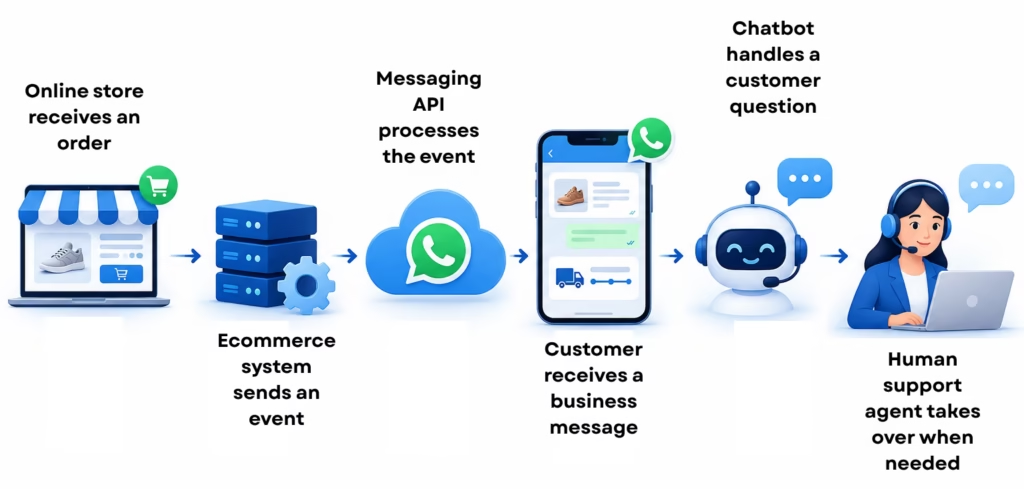
The API connects customer messaging with the events and systems that already power your online store.
Here is how a typical setup works.
1. Set up your business account
Your business completes the required onboarding and account setup. Depending on your configuration, this may include business verification and phone number registration.
2. Connect your ecommerce platform
Connect your store, CRM, order management system, or helpdesk using a supported integration, API, webhook, or connector.
3. Create message templates
Prepare templates for business-initiated messages such as order confirmations, shipping updates, and promotional campaigns. Applicable templates must be approved by WhatsApp before use.
4. Collect customer consent
Give customers a clear explanation of the messages they are agreeing to receive. Store consent records and provide a straightforward way to opt out.
5. Automate messaging workflows
Configure relevant events to trigger messages. For example, an order changing to “shipped” can trigger a notification containing a tracking link.
6. Manage replies and measure performance
Customers can reply to messages, ask questions, or request assistance. Depending on your setup, chatbots and support agents can manage these conversations while reporting tools help track delivery, engagement, and campaign results.
The exact workflow depends on your ecommerce platform, messaging configuration, and integration capabilities.
Key Features of WhatsApp Business API for Ecommerce
A well-configured WhatsApp integration does more than deliver notifications. It helps businesses coordinate transactions, support, and customer engagement through a connected communication channel.
1. Automated order notifications
Send relevant updates when an order is placed, confirmed, dispatched, or delivered. These messages help customers stay informed without needing to contact your support team for every update.
2. Rich media and interactive messages
Depending on the supported message format and account capabilities, businesses can share product images, documents, links, buttons, and interactive message elements.
For example, a fashion retailer could send a product link alongside an order update or provide a direct link to its returns page.
3. Chatbots and automated replies
A WhatsApp chatbot for ecommerce can answer frequently asked questions about delivery times, order status, product availability, store policies, and returns.
For more complex requests, the workflow can transfer the conversation to a human agent.
4. Shared team inbox
A shared inbox allows customer support, sales, and other authorized teams to manage conversations through connected software. Assignment rules and conversation history can help prevent missed queries and duplicated responses.
5. Ecommerce and CRM integration
Connecting WhatsApp with your ecommerce platform and CRM allows customer information and order events to trigger relevant communication.
The available functionality depends on the integration. Some workflows may be supported by a ready-made connector, while others may require API or webhook development.
6. Messaging analytics
Reporting can help your team understand whether messages are being delivered, read, clicked, or answered, where supported. Campaigns can also be evaluated against business outcomes such as recovered orders or repeat purchases.
Analytics should be used to improve messaging decisions rather than assuming every delivered message produces a sale.
Benefits of WhatsApp Business API for Ecommerce
The biggest benefits come from combining timely communication with automation and relevant customer experiences.
1. Keep customers informed after purchase
Customers want to know whether their order has been confirmed, shipped, or delivered. Automated notifications provide this information without requiring a support agent to send each update manually.
A tracking link or a delivery-help option can make the message more useful.
2. Reduce repetitive customer support queries
Questions such as “Where is my order?”, “What is your return policy?” and “When will my refund be processed?” can consume a significant amount of support time.
When order data and business policies are connected to an approved messaging workflow, automated responses can handle straightforward requests. Agents can then focus on exceptions that require investigation or judgment.
3. Improve abandoned cart recovery
A customer may leave a cart because they are unsure about sizing, delivery charges, or payment options.
A timely reminder, sent to a customer who has provided the appropriate consent and where the message complies with WhatsApp requirements, can bring the customer back to the checkout page.
The objective is to make completing the purchase easier, not to repeatedly pressure the customer.
4. Create a more personal customer experience
A message linked to a customer’s recent order is more useful than a generic promotion sent to everyone.
With appropriate data access and permissions, ecommerce brands can tailor communication based on order status, product interest, or purchase history.
Personalization should remain relevant, transparent, and respectful of customer privacy.
5. Support repeat purchases
Communication does not need to stop when an order is delivered. Brands can request feedback, share product care information, announce relevant new arrivals, or send replenishment reminders where appropriate.
These touchpoints can help maintain the relationship after the first purchase.
6. Make customer communication easier to measure
WhatsApp workflows can be evaluated using message delivery, replies, link clicks, support resolution, cart recovery, and repeat-purchase metrics.
These measurements help businesses understand which messages provide value and which need improvement.
Results vary by audience, product category, offer, timing, and the quality of the customer experience. WhatsApp API should therefore be treated as a channel to test and optimize, not a guarantee of higher sales.
6 Practical Ecommerce Use Cases for WhatsApp Business API
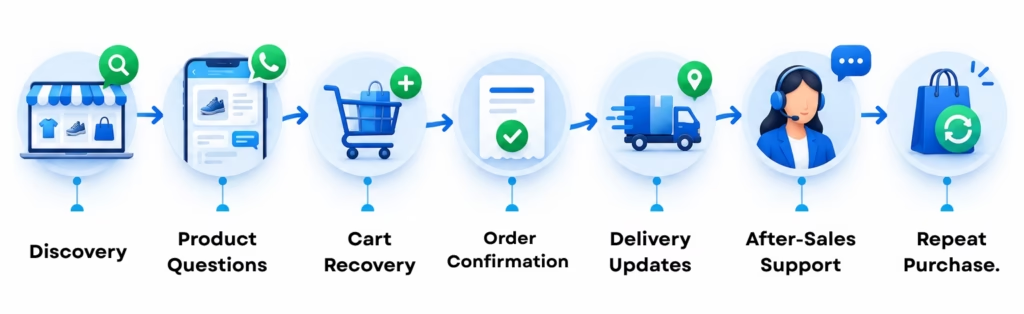
Understanding individual use cases makes it easier to decide where automation can deliver the most value.
1. WhatsApp Order Confirmation Messages
Immediately after a successful order, send the customer an order confirmation containing relevant details such as:
- Order number and confirmation status
- A summary or link to the purchased items
- Expected delivery information, if available
- A link to view order details or contact support
A simple message might look like this:
Hi Riya, your order #W365104 has been confirmed. You can view your order details and delivery updates here: [Order Link].
Need help with your purchase? Reply to this message and our team will assist you.
This example is illustrative. Use actual order data and message templates that have been appropriately configured and approved.
2. WhatsApp Order Tracking and Delivery Notifications
Delivery updates are another strong starting point for automation.
Your ecommerce system or connected logistics service can trigger messages when an order is dispatched, out for delivery, or marked as delivered.
For example:
Hi Riya, your order #W365104 has been dispatched. Track your shipment here: [Tracking Link].
You can also provide clear support options for delayed deliveries, unsuccessful delivery attempts, or return pickups.
The benefit is straightforward: customers receive useful information proactively, while the support team spends less time answering routine tracking questions.
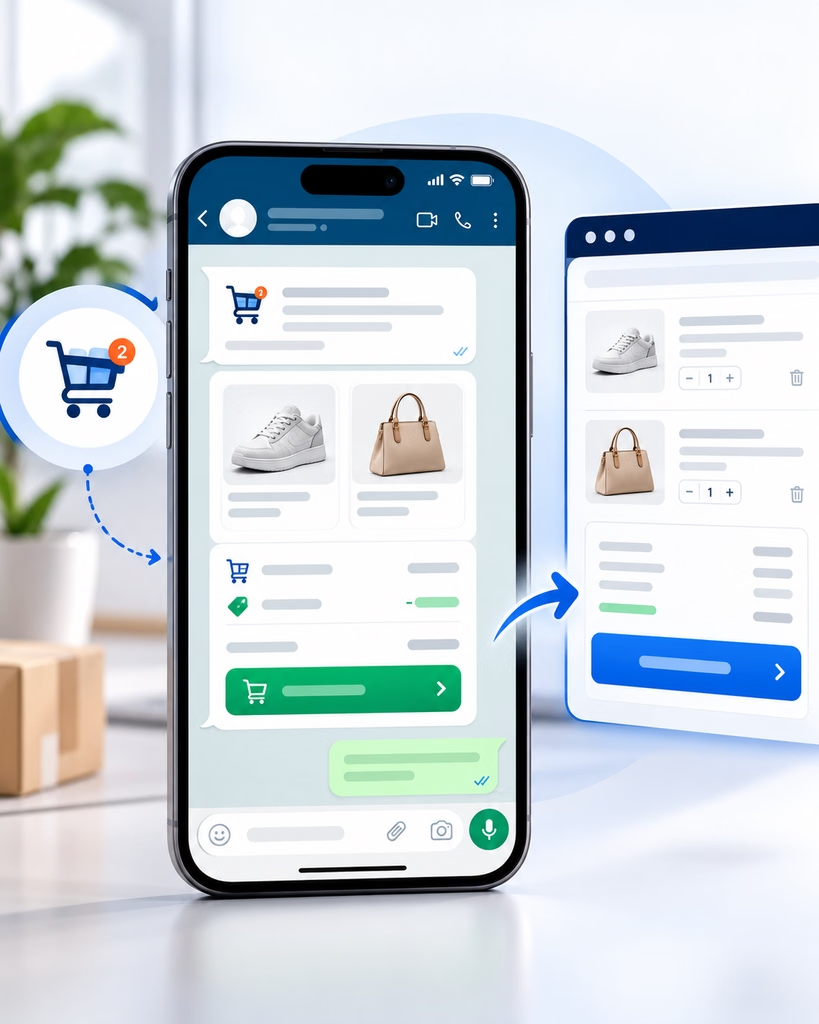
3. WhatsApp Abandoned Cart Recovery
Abandoned cart recovery helps ecommerce brands reconnect with customers who add products to their carts but do not finish purchasing.
A practical workflow looks like this:
- The store identifies an abandoned cart associated with a customer eligible to receive the message.
- After an appropriate delay, the system sends a relevant reminder using an approved template where required.
- The message includes a link back to the cart or checkout page.
- If the customer replies with a question, a chatbot or support agent provides assistance.
- The system measures completed purchases and suppresses unnecessary follow-ups.
Example message:
Hi Riya, you left a few items in your cart. Would you like to continue where you left off? You can review your cart here: [Cart Link].
Avoid sending repeated reminders simply because a customer has not purchased. Keep the communication limited, respect opt-outs, and use incentives only when they make commercial sense.
Measure success by completed purchases attributable to the workflow, not just message opens or link clicks.
4. WhatsApp Chatbot for Ecommerce Customer Support

An ecommerce chatbot can provide answers to common questions without requiring customers to wait for an available support agent.
Useful chatbot workflows include:
- Order status and shipment tracking
- Product information and availability
- Return, refund, and exchange policies
- Payment and delivery questions
- Store information and support requests
For example, a customer might ask, “Can I exchange my order for a different size?”
The chatbot can explain the exchange policy and provide the appropriate next step. If the request involves an exception or the customer needs additional help, it can transfer the conversation to a live agent.
The handoff matters. Automation should mak
5. WhatsApp Marketing and Product Recommendations
WhatsApp can also support promotional communication, product discovery, and customer retention.
Depending on customer preferences and applicable messaging rules, a brand may use WhatsApp to share:
- New product announcements
- Relevant product recommendations
- Back-in-stock alerts
- Sale announcements
- Post-purchase product guidance
- Feedback and review requests
- Replenishment reminders for suitable products
For example, a customer who purchases a coffee machine may appreciate information about compatible accessories or a reminder to reorder coffee supplies.
However, promotional messaging should have a clear purpose and appropriate consent. A large contact list is not permission to send every customer every offer.
6. Returns, Exchanges, and Feedback
Post-purchase communication is a useful way to address customer concerns before they become unresolved complaints.
A connected workflow can acknowledge a return request, explain the next steps, or provide a link to the relevant returns process. Once a purchase is completed, the business can request feedback at a sensible time.
Keep refund decisions and return statuses synchronized with the underlying order management system. A chatbot should not promise an outcome that the business system has not confirmed.
WhatsApp Business API Integration with Shopify and WooCommerce
The value of integration comes from connecting your store’s data to your messaging workflows. Without that connection, employees may need to copy order information manually or send updates one at a time.
The available setup depends on your store configuration, messaging provider, and installed applications.
WhatsApp API Integration with Shopify
A Shopify store can use supported apps, provider connectors, APIs, or webhooks to connect store events with WhatsApp messaging.
Depending on the integration, relevant events may include:
- New order creation
- Order fulfillment and shipping updates
- Payment status changes
- Cart abandonment
- Customer support requests
For instance, when an order is fulfilled, the integration can pass the necessary order and tracking information into a WhatsApp notification workflow.
Before implementation, check which Shopify events and data fields the chosen connector supports. Do not assume every provider offers the same functionality or a native integration for every workflow.
WhatsApp API Integration with WooCommerce
WooCommerce stores can connect WhatsApp using compatible plugins, APIs, webhooks, or custom development.
Depending on the configuration, a store can trigger messages when an order moves to a status such as processing, completed, or cancelled. Shipping information, cart data, and customer support details may also be connected where the relevant plugins and systems make them available.
WooCommerce sites often use different payment, shipping, and checkout plugins. Test these connections carefully before activating automated customer messages.
What to Check Before Integrating WhatsApp with Your Store
Before launching, confirm the following:
- Which store events your integration supports.
- Which order and customer fields can be passed securely.
- How message templates are created and approved.
- How customer consent and opt-outs are recorded.
- What happens when data is missing or a message fails to send.
- How replies are routed between chatbots and support agents.
- How performance and completed purchases will be measured.
Test the entire journey with sample orders before using it with real customers.
How WOCOM365 Supports Ecommerce Communication
An ecommerce business does not operate through messaging alone. Sales teams may need to follow up with leads, support agents may need to resolve an issue over a call, and marketing teams may need to send an important notification through another channel.
WOCOM365 provides business communication solutions across voice, messaging, and conversational AI. Its WhatsApp Business API offering supports two-way messaging, automated responses, rich media, template-based communication, and integration-oriented workflows.
For ecommerce businesses, this creates an opportunity to connect several customer touchpoints:
Customer notifications: Send relevant order, delivery, and service updates through configured WhatsApp workflows.
Conversational support: Use automation to manage common queries, with human assistance for more complex conversations.
CRM-connected communication: Connect relevant customer interactions with supported CRM systems and APIs, subject to the integration setup.
Multi-channel engagement: Combine WhatsApp with other WOCOM365 services, such as SMS messaging, where appropriate for the use case.
AI-assisted interactions: Explore WOCOM365 AI innovations for conversational automation that fits your customer communication requirements.
The goal is to reduce disconnected workflows and give customers a more consistent experience across relevant touchpoints.
Explore the WOCOM365 WhatsApp Business API solution to review the available capabilities.
Best Practices for Using WhatsApp Business API in Ecommerce
A successful messaging strategy depends on how the channel is used, not simply on how many messages a business can send.
Obtain and maintain customer consent
Before sending business-initiated messages, obtain the required permission and clearly explain what customers can expect. Meta recommends setting appropriate expectations for different message categories and respecting opt-out requests.
Maintain a record of consent and make it easy for customers to stop receiving messages.
Use approved templates correctly
Messages sent outside the active customer service window generally require approved templates. The purpose and content of each template should match its approved use.
Review the current WhatsApp Business Messaging Policy before launching or changing your workflows.
Keep messages relevant and timely
Order updates should relate to actual order events. Promotional content should be suitable for the recipient and the consent provided.
Avoid sending unnecessary reminders, excessive promotional messages, or notifications at inappropriate times.
Protect customer information
Use secure connections and limit access to customer information to authorized systems and staff. Avoid requesting sensitive payment credentials or unnecessary personal information in chat.
Your implementation should also follow applicable privacy laws and your own privacy policy.
Provide a clear path to human support
Not every customer question can be resolved through automation. Make escalation straightforward, and pass useful conversation context to the support agent so the customer does not have to explain the entire issue again.
Review performance regularly
Monitor customer responses, message delivery, clicks, support resolution, opt-outs, and completed purchases. Use these results to improve message content, timing, and workflows.
How to Measure WhatsApp Ecommerce Performance
Track the outcomes that matter to your business rather than using message volume as the primary measure of success.
| Metric | What it helps you understand |
| Delivery rate | Whether messages are reaching recipients |
| Read rate, where available | How often delivered messages are marked as read |
| Click-through rate | Whether customers click on links or calls to action |
| Cart recovery rate | How effectively the workflow brings eligible customers back to purchase |
| Customer support resolution | Whether queries are being resolved efficiently |
| Opt-out and block signals | Whether message frequency or relevance may be creating problems |
| Repeat purchase rate | Whether retention campaigns contribute to subsequent orders |
| Cost per recovered order | Whether the recovery workflow is commercially worthwhile |
Define the measurement method before starting a campaign. For abandoned carts, for example, specify the attribution window and distinguish purchases influenced by WhatsApp from purchases that would have happened anyway.
This creates a more reliable basis for evaluating performance.
How to Choose the Right WhatsApp Business API Provider for Ecommerce
The best provider is not necessarily the one with the longest feature list. It is the one that fits your business processes, technical environment, expected messaging volume, and support requirements.
Evaluate the following areas before making a decision.
| Evaluation area | Questions to ask |
| Onboarding | What support is available for account setup and verification? |
| Integration | Can the provider connect with your store, CRM, and order management system? |
| Automation | Can you configure order updates, reminders, and customer support workflows? |
| Team inbox | Can conversations be assigned to agents with shared history and visibility? |
| Analytics | Which delivery, engagement, and conversion metrics are available? |
| Pricing | What are the applicable Meta messaging charges and provider platform or service fees? |
| Support | Who helps troubleshoot failed messages, integration problems, and template issues? |
| Security | How are customer information, permissions, and access controls managed? |
| Scalability | Can the setup accommodate your expected volume and future workflows? |
Ask for a walkthrough of the actual workflows you intend to use. A provider may support the WhatsApp API but still require additional configuration or development for your particular ecommerce platform.
Frequently Asked Questions
What is WhatsApp Business API for ecommerce?
WhatsApp Business API for ecommerce enables online stores to connect WhatsApp messaging with their ecommerce platforms, CRMs, and support systems. Businesses can use it for order notifications, customer support, cart recovery, and relevant promotional communication.
Can WhatsApp Business API recover abandoned carts?
Yes. Eligible customers can receive relevant cart reminders with links to continue shopping. Businesses should use the appropriate approved templates where required, respect customer consent, and measure whether the workflow results in completed purchases.
Does WhatsApp Business API work with Shopify and WooCommerce?
Both Shopify and WooCommerce can be connected with WhatsApp using compatible applications, APIs, webhooks, or other supported integration methods. The exact functionality depends on the provider, store configuration, and plugins being used.
Can I automate order confirmation and delivery updates?
Yes. A connected ecommerce system can trigger WhatsApp messages when supported order events occur, such as order confirmation, shipment dispatch, or delivery updates. These workflows must be configured with appropriate message templates and permissions.
Can a WhatsApp chatbot handle ecommerce customer support?
Yes. A chatbot can handle routine questions about tracking, product information, returns, delivery, and store policies when it has access to the necessary information. Complex requests should be transferred to a support agent.
Is WhatsApp Business API free for ecommerce businesses?
Do not assume it is free. Costs may include WhatsApp messaging charges, provider fees, software subscriptions, integration work, or other services. The final cost depends on your usage, configuration, provider, and the applicable pricing rules.
Review the current WhatsApp Business Platform pricing information and request a clear breakdown of any additional provider charges.
Do customers need to opt in to receive WhatsApp messages?
Yes. Businesses must obtain the required permission before initiating business messaging and respect customers’ requests to stop receiving messages. The consent process should clearly explain what kinds of messages customers can expect.
How does WOCOM365 help ecommerce businesses use WhatsApp API?
WOCOM365 offers WhatsApp Business API capabilities for business messaging, including two-way communication, automated responses, rich media, and integration-oriented workflows. Businesses can explore its solution to determine which features and integrations fit their ecommerce requirements.
A good ecommerce experience does not end when a customer clicks the purchase button. Customers still need order updates, delivery information, assistance with returns, and relevant reasons to shop again.
Turn Abandoned Carts Into More E-commerce Sales
Combine WhatsApp Business API and automated outbound calls to re-engage shoppers, recover abandoned carts, and create more opportunities to convert website visitors into paying customers.