Your ad dashboard says traffic is up 40% this quarter. Your sales report says revenue barely moved.
Most e-commerce teams have lived this. Visitors browse, add products to the cart, and then vanish. Spending more on ads brings in more of the same visitors, and the same leak stays open at the bottom of the funnel.
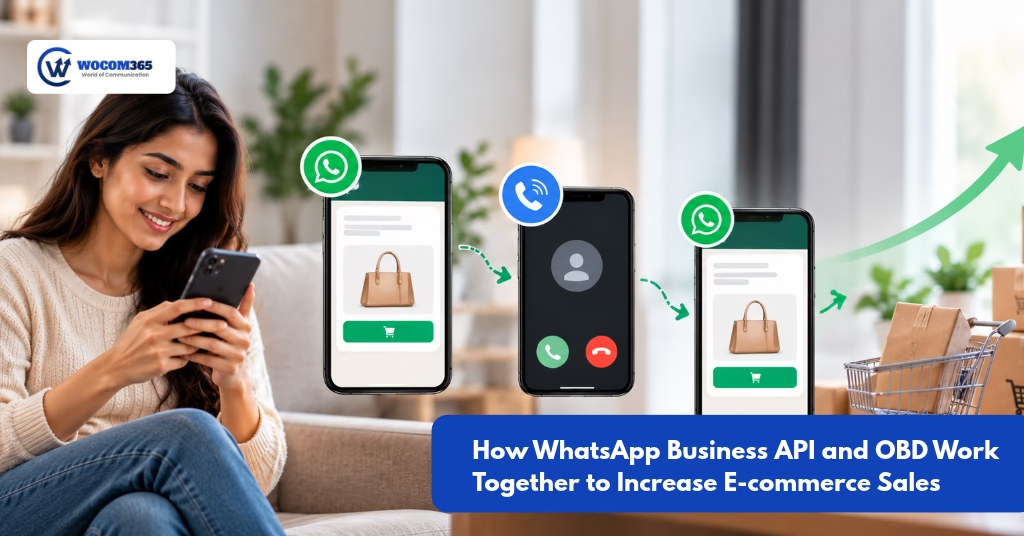
The fix usually isn’t more traffic. It’s better follow-up, and that’s where WhatsApp Business API and OBD work well together. WhatsApp gives you a rich, always-on messaging channel. OBD (outbound dialing) gives you a voice channel for people who ignore messages. Used separately, each helps a little. Used in sequence, they cover each other’s gaps.
This guide explains how the two channels fit together and what a realistic campaign looks like. It also covers how to measure results so you know whether it’s working.
Why High Website Traffic Doesn’t Always Mean More Sales
Before adding tools, it helps to know where sales are actually being lost. For most online stores, it comes down to five places:
- Abandoned carts. The shopper wanted the product but got distracted, compared prices, or wasn’t ready to pay.
- Payment failures. A bank timeout, a wrong OTP, or a UPI hiccup kills the order, and many shoppers don’t retry on their own.
- Unanswered questions. “Is this available in my size?” “Does it deliver to my pincode?” If nobody answers within minutes, the shopper moves on.
- Checkout friction. Forced account creation, surprise shipping charges, or too many form fields.
- COD hesitation. In India especially, cash-on-delivery orders get placed and then cancelled or refused at the door.
Email recovery flows help, but inboxes are crowded and open rates are modest. Push notifications only work for people who allowed them. You need channels with higher visibility and a way to reach people who ignore the first nudge. That’s the idea behind abandoned cart recovery automation that uses more than one channel.
What Is WhatsApp Business API?
The WhatsApp Business API is the version of WhatsApp built for companies that need to message customers at scale. Unlike the free WhatsApp Business app, which is designed for one small team on one phone, the API connects to your own systems: your store, CRM, payment gateway, and support desk.
For e-commerce, that means you can:
- Send order confirmations, shipping updates, and delivery alerts automatically
- Share cart reminders with the product image and a direct checkout link
- Send payment-failure reminders with a retry link
- Handle two-way support conversations with automated replies and human handoff
- Run opted-in promotional campaigns using pre-approved message templates
The main reason to use WhatsApp Business API for e-commerce is behavior. People already spend their day in WhatsApp, and a message with an image, a button, and a payment link is far easier to act on than a plain SMS. Two rules apply, though. Customers must opt in, and business-initiated messages outside the 24-hour service window must use templates approved by WhatsApp.
You can see how this works on the WOCOM365 WhatsApp Business API page, which covers templates, automation, and two-way conversations.
What Is OBD Calling?
OBD stands for outbound dialing, sometimes called automated outbound calling or voice broadcast. The system places calls to a list of customers and plays a pre-recorded or dynamic voice message. It can also capture a response, such as “Press 1 to confirm your order” or “Press 2 to speak to an agent.”
It might sound old-school next to WhatsApp, but OBD calling for e-commerce businesses has a particular strength: a ringing phone is hard to ignore. Not everyone checks WhatsApp promptly, but most people look at an incoming call.
Good e-commerce use cases include:
- Confirming high-value or COD orders before dispatch
- Reminding a shopper about an abandoned cart or failed payment
- Alerting customers to delivery attempts or address issues
- Announcing a restock of an item they were interested in
- Collecting quick feedback after delivery
OBD works best for short, clear, time-sensitive messages. It’s a poor fit for long explanations or anything that needs a link, and that’s the gap WhatsApp fills. Explore the WOCOM365 Automated Outbound Calling solution to see what’s possible.
How WhatsApp Business API and OBD Work Together
Each channel has one weakness the other covers.
| WhatsApp Business API | OBD Calling | |
| Strength | Rich content, links, buttons, images | High attention, immediate |
| Weakness | Easy to leave unread | Can’t carry links or visuals |
| Best role | First touch and the conversion step | Escalation and urgent nudges |
Here’s how the journey can look in practice:
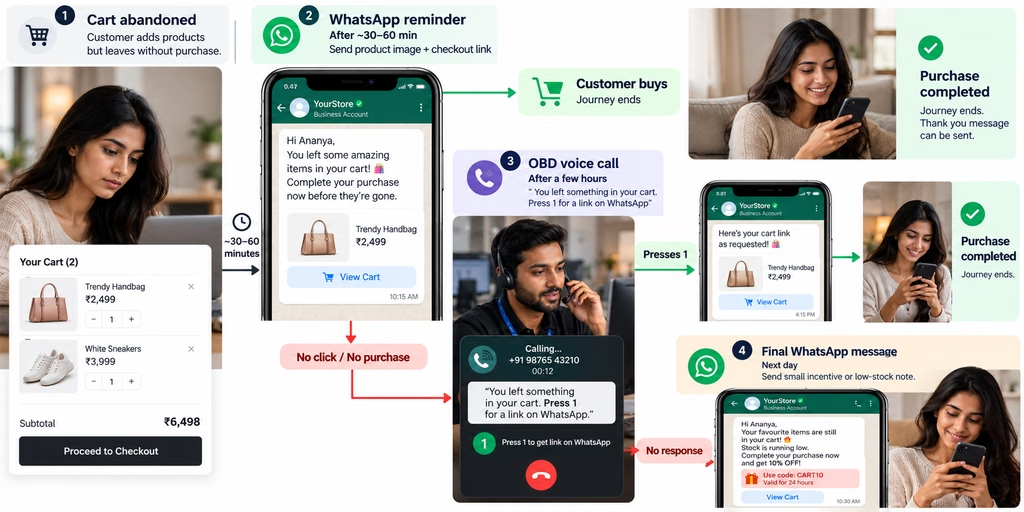
Notice what’s happening. WhatsApp carries the content and the checkout link. OBD carries the urgency. When someone presses 1 on the call, the WhatsApp message arrives within seconds, so the shopper can finish checkout without hunting for the site again.
The same logic works for failed payments. A WhatsApp message goes out right after the failure with a retry link. If the order is still unpaid a few hours later, a short voice call prompts the customer to check WhatsApp. For COD orders, an OBD call can confirm intent, and WhatsApp then sends the order summary and tracking link.
With a platform like WOCOM365, both channels run from the same place, so the trigger, timing, and customer data stay in sync instead of living in two disconnected tools.
Real-World Example: An E-commerce Brand With 50,000 Visitors
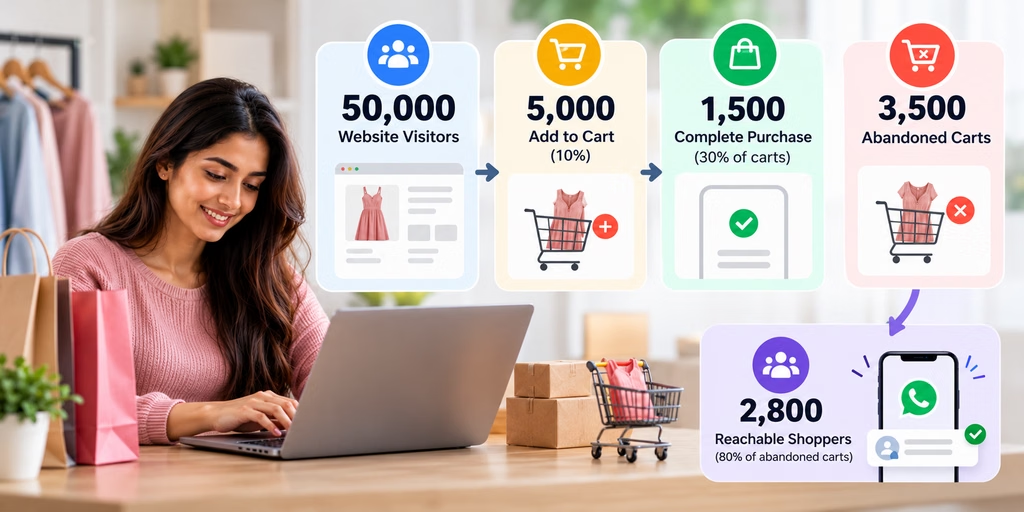
This is a hypothetical scenario for illustration only. These aren’t real campaign results, and your numbers will differ.
Imagine an online fashion store with these monthly numbers:
- 50,000 website visitors
- 5,000 add something to the cart (10%)
- 1,500 complete the purchase (30% of carts)
- 3,500 abandoned carts
- Average order value: ₹1,500
Suppose 80% of those abandoned-cart shoppers gave a phone number with consent, which gives about 2,800 reachable shoppers.
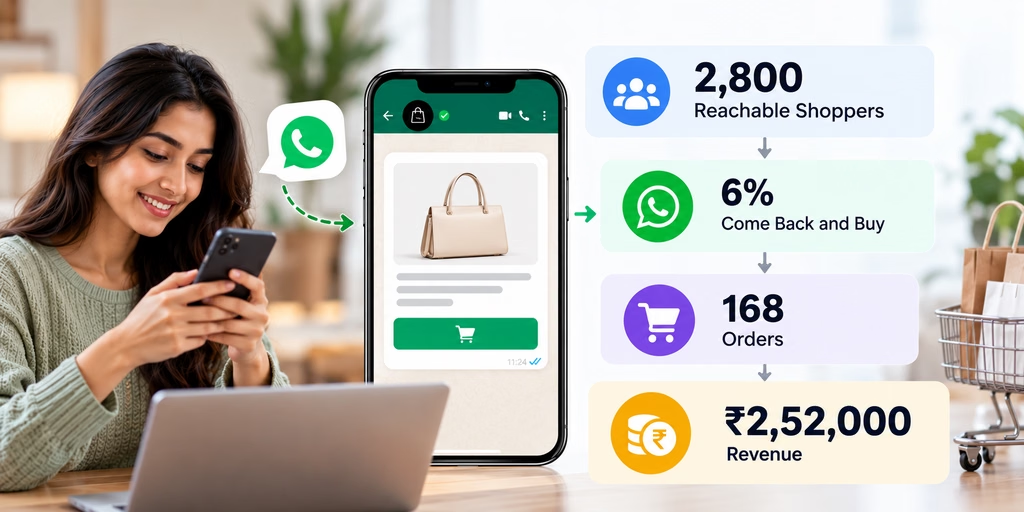
Scenario A: WhatsApp reminders only. Say 6% of reachable shoppers come back and buy:
2,800 × 6% = 168 orders × ₹1,500 = ₹2,52,000
Scenario B: WhatsApp + OBD follow-up. OBD targets people who ignored the WhatsApp message. Say it adds another 2% recovery:
2,800 × 2% = 56 extra orders × ₹1,500 = ₹84,000 additional
Total recovered: 224 orders, about ₹3,36,000 per month
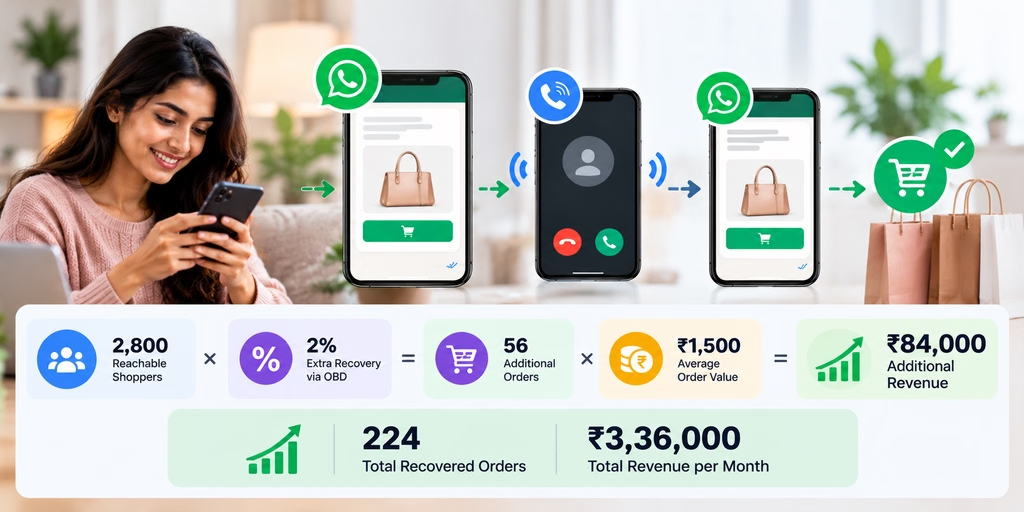
Even at conservative assumptions, the combined approach adds a third more recovered revenue than WhatsApp alone, without buying a single extra visitor. The point isn’t the exact figure. Recovery of even a small percentage of abandoned carts can pay for the campaign, and your own data will show where your numbers land.
Benefits of Combining WhatsApp API and OBD
Better cart recovery. Two different channels at two different moments give you more chances to catch someone while they still intend to buy.
Faster lead follow-up. New enquiries, such as bulk orders and product questions, get an instant WhatsApp response, and a call can follow if there’s no reply.
Fewer failed payments and COD returns. Reminders for incomplete payments plus voice confirmation for COD orders reduce lost and returned orders.
Less manual work. Your support team stops chasing carts one by one. Automation handles the routine nudges, and agents step in only when a customer replies or presses the option to speak to someone.
A more consistent experience. The customer hears one coordinated message, not three disconnected ones from different tools.
Reach beyond one habit. Some customers answer calls and some answer messages. Using both means you aren’t betting on a single behavior.
How to Measure Campaign Performance
A campaign you can’t measure is just noise. Track these metrics from day one:
- Recovery rate: Recovered orders ÷ total abandoned carts contacted. This is your headline number.
- Conversion rate by channel: What share of shoppers bought after the WhatsApp message, after the call, and after both? This shows what OBD actually adds.
- Revenue attributed to the campaign: Total order value from shoppers who purchased within a defined window (say, 48 to 72 hours) after being contacted.
- Cost per recovered order: Total campaign cost (message fees, call charges, platform cost) ÷ recovered orders. Compare it against your average margin per order.
- Engagement signals: WhatsApp read and click rates, call pick-up rate, and the share of people who pressed the key to get the link.
- Opt-out rate: If it’s rising, your frequency or targeting needs work.
For clean results, keep a holdout group, a small sample of abandoned-cart shoppers who receive no follow-up. Comparing them to the contacted group tells you how many sales were truly caused by the campaign rather than people who would have returned anyway. Use UTM parameters on checkout links so GA4 can attribute the revenue correctly.
Frequently Asked Questions
How much does it cost to use WhatsApp Business API and OBD together?
Cost depends on a few things: WhatsApp’s per-message charges (which vary by message category and country), your platform provider’s fees, and per-call or per-minute voice charges. The better question is cost per recovered order compared with your margin. Ask your provider for a quote based on your expected volume.
Can this be fully automated?
Largely, yes. Triggers like cart abandonment or payment failure can start the sequence automatically, with timing rules and branching based on what the customer does. Human agents typically step in for replies that need judgment, such as sizing questions or complaints.
Does it integrate with my store and CRM?
It can. Most setups connect through APIs or webhooks to your e-commerce platform and CRM. WOCOM365 lists integrations with CRMs such as Salesforce and Zoho, and you can confirm compatibility with your specific stack during a demo.
Do I need customer consent?
Yes. WhatsApp requires opt-in before you send business-initiated messages, and calling rules apply as well. In India, outbound calls and promotional messages are subject to telecom regulations such as TRAI’s DND and registration requirements, and data handling falls under privacy law. Capture clear consent at checkout, respect opt-outs, and have your legal or compliance team review your setup. This article isn’t legal advice.
Which should I use first, WhatsApp or OBD?
For most stores, WhatsApp first. It’s cheaper per touch, carries the checkout link, and handles most recoveries. OBD works best as a second step for non-responders, high-value carts, and COD confirmation.
How do I know it’s working?
Compare recovery rate and revenue against a holdout group, and watch cost per recovered order. If it’s lower than your margin per order, the campaign is paying for itself.
Conclusion: Turn Existing Traffic Into Revenue
Getting visitors to your store is the expensive part. Losing most of them at the cart or payment step is the avoidable part.
WhatsApp Business API gives you a rich, link-friendly channel for reminders and support. OBD gives you a high-attention channel for people who didn’t respond. Together, in the right sequence and with proper consent, they give abandoned carts and failed payments a real second chance.
Turn Abandoned Carts Into More E-commerce Sales
Combine WhatsApp Business API and automated outbound calls to re-engage shoppers, recover abandoned carts, and create more opportunities to convert website visitors into paying customers.
Similar Blogs
- How WhatsApp Business API and OBD Work Together to Increase E-commerce SalesYour ad dashboard says traffic is up 40% this quarter. Your sales report says revenue barely moved. Most e-commerce teams… Read more: How WhatsApp Business API and OBD Work Together to Increase E-commerce Sales
- WhatsApp Business API Festive Marketing: Diwali Guide
 WhatsApp Business API for Festive Season Marketing: A Practical Playbook for Diwali and Beyond Festive season is the one stretch… Read more: WhatsApp Business API Festive Marketing: Diwali Guide